

The Microgreen Tracking App — Made by Growers, for Growers
Microgreen Tracker knows the timing for 80 crops and 284 varieties, so your whole grow room becomes one short daily list: what to pre-soak, plant, water, move into light, and cut.

- crops built in
- 80crops built in
- varieties
- 284varieties
- growth stages tracked
- 9growth stages tracked
Microgreen tracking features
Built around how microgreens are actually grown, not a generic to-do app with plants painted on it.
Also included on every plan
- Bulk actions across every stage
- Saved grow recipes & tray setups
- Simple Mode for casual growers
- Guided and logbook tray modes
- Install to your home screen
- English and Spanish
- Dark mode + 4 text sizes
- Global search (Ctrl/Cmd-K)
- WCAG AA accessible
- 31 in-app guides + FAQ
- Grow troubleshooting reference
How it works
Add your trays
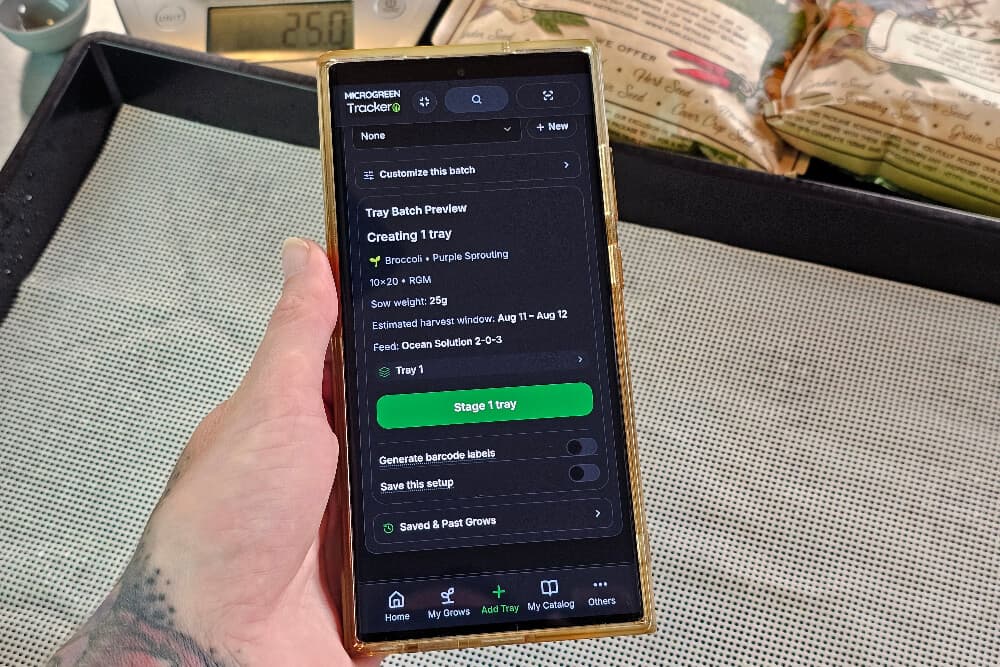
Pick the crop and variety, set the sow date, and the app fills in pre-soak hours, blackout days, and your expected harvest date. Sow weight is calculated for your tray size.
Work today’s list
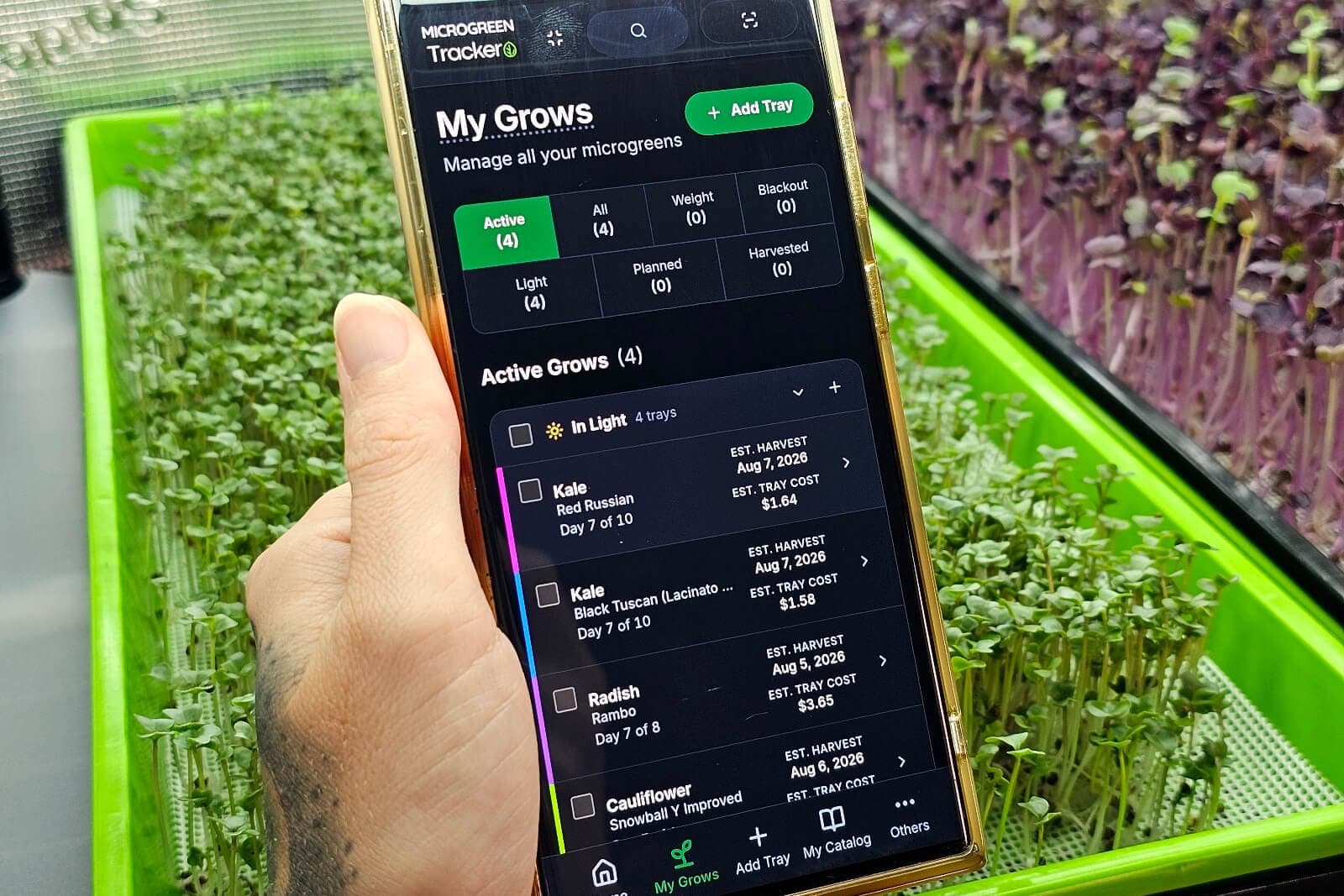
Your dashboard shows only what needs attention today: water these, uncover those, cut this one. Check off as you go and it clears.
Log the harvest and improve
Record weight and quality. Your history tells you which varieties and methods produce, so the next round is better than the last.
Start with the trays you have going right now
Add one tray, pick the crop, and the pre-soak, blackout, and harvest dates fill themselves in. Tomorrow morning it’s already on your list.
Start Tracking FreeWho Microgreen Tracker is for
Not built for hydroponic leafy greens, cannabis, or general vegetable gardening. The timing model is microgreens-specific on purpose.
Frequently Asked Questions
Is there a free microgreen tracking app?
Yes. Microgreen Tracker is free for up to 2 active trays, with no credit card and no trial clock. Free runs the whole day-to-day app rather than a demo: the daily task list, push watering reminders, the calendar, Supplies, customers and orders, barcode labels and scanning, the whole crop library, succession planting, Simple Mode, and Spanish. Three things are paid: the Grow Stats analytics page, cost analytics, and CSV/Excel export. Free still records everything they read, so nothing is lost while you decide.
How much does microgreen tracking software cost?
Microgreen Tracker starts at $3.95 a month. Free covers 2 active trays. Starter is $3.95/mo for 25 trays and 2 collaborator seats, Grow is $9.95/mo for 100 trays, Pro is $19.95/mo for 1,000 trays, and Scale is $39.95/mo for 2,500 trays and 20 seats. Above Starter you are buying tray capacity and seats, nothing else. The feature set is identical. Free still records your cost inputs in the background, so your whole cost history is already there the day you upgrade.
What is Microgreen Tracker?
Microgreen Tracker by On The Grow is a web app for managing microgreen grows from seed to harvest. It tracks every tray through its real growing stages: pre-soak, planted, weighted or blackout, into light, ready, and harvested. The whole grow room becomes one short daily task list. Every plan includes the day-to-day app: tray tracking, push watering reminders, the calendar, Supplies (seeds, mediums, fertilizers, equipment), Business (customers, orders, recurring orders, per-order planting plans), and barcode labels. Grow Stats, cost analytics, and export are on paid plans. A library of 80 crops and 284 varieties ships with it, and every value is yours to override.
How is this different from a spreadsheet?
A spreadsheet is a record: you open it and read rows, then work out what to do. This leads with the work. The home screen is a checklist generated fresh each day from the state of every tray and the timing of each crop, with overdue harvests and transitions flagged first. It also does things a spreadsheet cannot: back-calculate a sow date from the harvest date you need, cost a tray including the electricity your lights used, and turn a customer order into a planting schedule where staggered crops all finish on the same morning.
Do I need to download an app, or does it work in a browser?
It works in any phone or desktop browser, with no App Store or Play Store download. You can install it to your home screen, where it opens full-screen like a native app, because it is a progressive web app. Your data syncs across every device you sign in on. The interface is available in English and Spanish, meets WCAG AA accessibility standards, and offers four text sizes and a dark mode for reading a screen at arm’s length in a grow room.
How many microgreen varieties does it support?
80 crops and 284 varieties ship built in, including broccoli, radish, pea, sunflower, kale, arugula, mustard, cabbage, amaranth, basil, cilantro, and many more. Each carries a recommended sow weight, days to harvest, germination and blackout timing, pre-soak hours, and an expected yield, which is what powers the transition suggestions and harvest projections. Every value is overridable for your own conditions, and you can add fully custom crops and varieties of your own.
Does it send watering reminders to my phone?
Yes, on every plan including Free. Opt in and you get push notifications at a morning and/or evening time you pick, in your own timezone. They are aggregated, so forty trays due means one notification saying forty trays need watering, not forty buzzes. They are web push notifications, so we do not send reminder emails or text messages.
What can I track?
Trays with crop, variety, sow date, tray size, medium, and grow type. Every stage change, watering (mist, top, or bottom, with amounts), and note, kept as a full timeline. Harvests with weight, quality grade, and a live yield ratio, plus multiple harvests per tray if you cut and come again. Failures with a specific reason, so you can spot patterns. Seed, medium, fertilizer, and equipment inventory, tracked per purchase batch so a tray traces back to the exact seed lot that grew it. Customers, orders, and recurring standing orders. All of it is recorded on every plan including Free. It shows up on the task dashboard and the monthly calendar, and the Grow Stats page analyzes it on paid plans.
Can I track customer orders and delivery dates?
Yes. Add a customer and an order with its lines in pounds and ounces, the way wholesale microgreens are actually quoted, and the app builds a planting plan. Each line counts back from one shared harvest date using that crop’s own timing, so a 12-day crop gets sown before an 8-day crop and both are cut the same morning. It tells you how many trays and when to sow each one, and one button plants the whole batch. Delivery dates appear on the monthly calendar alongside sow dates, transitions, and harvests, and standing weekly or biweekly orders generate themselves on schedule. Orders are a production tool, not an invoicing system, so there is no pricing, payment, or revenue reporting.
Will it work for a commercial microgreen farm?
Yes, up to 2,500 active trays and 20 collaborator seats on the Scale plan (1,000 trays and 10 seats on Pro). At that volume the tools that matter are bulk actions across every stage, barcode labels and scanning to act on a whole shelf at once, seed-lot traceability from any tray back to the batch it came from, planting plans generated from the order book, and CSV and Excel export. Production planning stops living in a spreadsheet.
Can other people on my farm use it?
Yes, on paid plans. Invite collaborators by email into your workspace and they get full access to the grow data while billing and member management stay with you as the owner. Seats are included in the price with no per-seat metering: 2 on Starter, 5 on Grow, 10 on Pro, 20 on Scale, in addition to you. Shared settings like timezone and tray defaults apply to the whole operation, while personal settings like text size, language, and Simple Mode stay per person.
Can I export my grow data?
Yes, on Starter and up, to both CSV and Excel across four areas: Grow Stats and harvest history, tray data with selectable columns, an individual order, and the calendar. Drop it into a spreadsheet, build your own reports, or hand it to a bookkeeper. We do not currently offer spreadsheet import, so there is no bulk migration of existing records in.
I only grow a few trays. Is this too much app?
Turn on Simple Mode. It strips the app back to Home, My Grows, and Plant, hides the number-heavy detail like grams, volumes, costs, and yields, and reduces planting to picking a crop, a variety, and a sow weight. It is a per-person view setting, not a different plan, and it is completely reversible. Nothing is deleted, blocked, or recalculated, so the full toolkit is one switch away if you ever grow into it.
Is it available in Spanish?
Yes. The whole interface is translated into Spanish, not just part of it, and language is a per-person setting, so one grower in a shared workspace can work in Spanish while another works in English, on the same trays and the same data.
Is my data private and secure?
Yes. Your grow data is scoped to your workspace and we don’t sell it. We use industry-standard security and storage. See our Privacy Policy and Terms of Service for full details.
Already have an account? Sign in
- 80 crops
- 284 varieties
- 9 tracked stages
- Up to 2,500 active trays
- English and Spanish
- WCAG AA
- Works in any phone browser