

The Microgreen Tracking App Made by Growers, for Growers
Built by the On The Grow team, trusted by 152K+ growers on YouTube.
Microgreen Tracker knows the timing for 81 crops and 286 varieties, so your whole grow room becomes one short daily list: what to pre-soak, plant, water, move into light, and harvest.
- Card required, nothing charged for 7 days
- Cancel anytime
- Your trays and data carry over


Your whole grow room, in your pocket
Add Microgreen Tracker to your home screen and it opens like any app, reminders and all. No App Store, no download, no waiting.
- crops built in
- 81crops built in
- varieties
- 286varieties
- growth stages tracked
- 9growth stages tracked
Microgreen tracking features
Built around how microgreens are actually grown, not a generic to-do app with plants painted on it.
A daily task list for your whole grow room
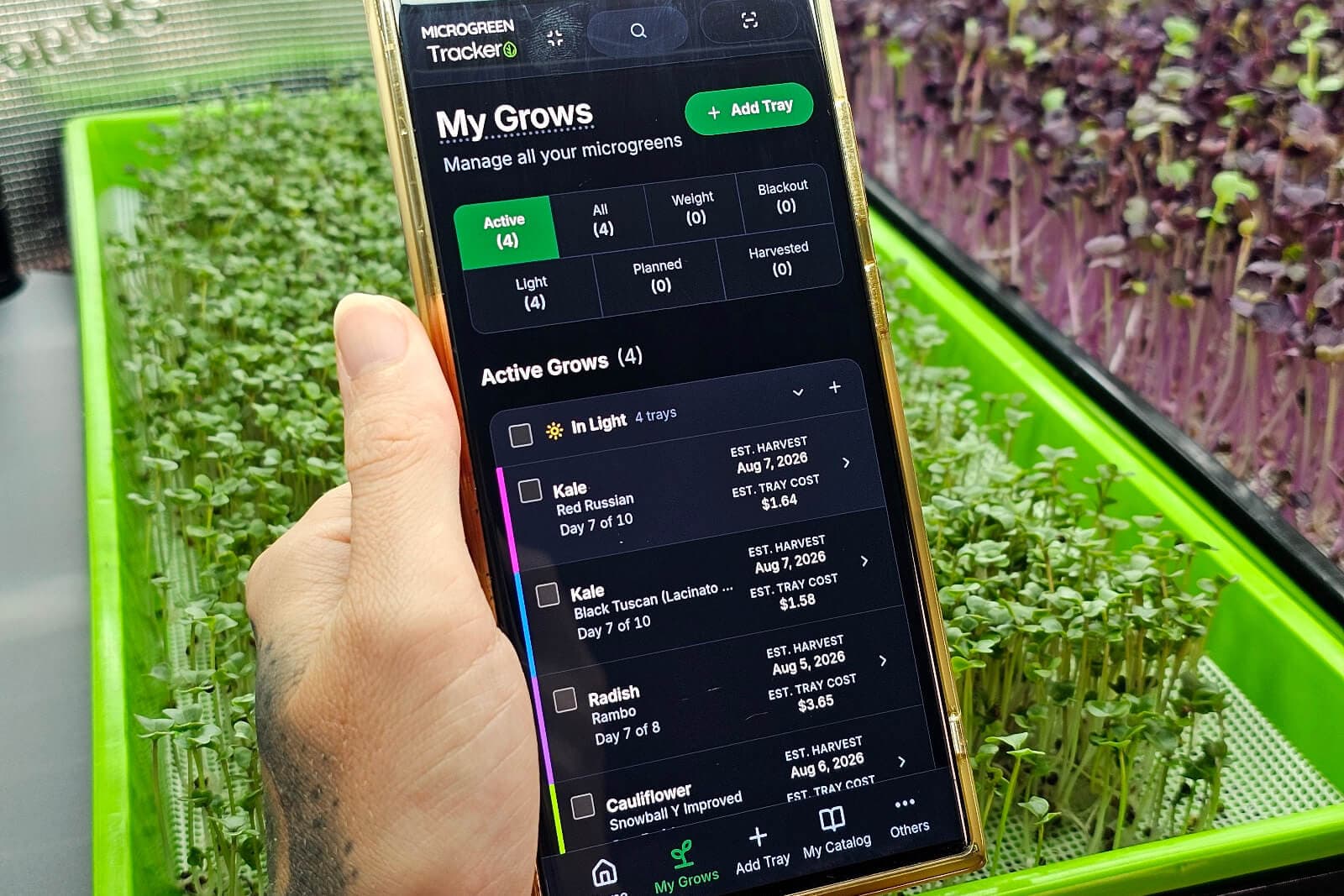
Open the app and it tells you what to do today: pre-soak these, plant those, uncover, water, harvest. Sorted by urgency, with overdue work first, and you act on a tray without leaving the list.
Plan backward from a delivery date
Name the day you need the greens and the app tells you when to sow, from each crop’s own timing. A customer order becomes a planting plan where a 12-day crop and an 8-day crop are ready the same morning.
True cost per tray, down to the electricity
Seed, medium, fertilizer by dilution rate and the water each tray drank, and power from light wattage and hours. Reusable silicone grow medium amortizes over every grow, so you get a real number.


Growing
Every tray, seed to harvest
Nine real growing stages, with the date math done for you.
Reminders on your phone
Watering, harvest-day, and delivery-day pushes at times you choose.
81 crops, 286 varieties
Sow density and every phase timing built in, all yours to override.
Succession planting
Schedule a whole run of staggered waves in one action.
Supplies and orders
Seed and supply inventory
Stock per purchase batch, deducted when you plant, with low-stock alerts.
Customers and standing orders
Orders in pounds and ounces, weekly repeats, and a printable pack sheet.
Barcode labels and scanning
Print labels, then scan one tray or a whole shelf to act on it.
Seed-lot traceability
Any tray traces back to the exact seed batch that grew it.
Records and reports
Harvest logs and yield
Weight, quality grade, and a live yield ratio at every harvest.
Monthly grow calendar
Sow dates, transitions, waterings, harvests, and deliveries in one view.
Grow Stats
Yield per crop and failure patterns from your harvest history.
CSV and Excel export
Grow stats, tray data, orders, customers, and the calendar.
Also included on every plan
- Bulk actions across every stage
- Saved grow recipes & tray setups
- Guided and logbook tray modes
- Collaborator seats on every plan
- English and Spanish
- Dark mode + 4 text sizes
- Global search (Ctrl/Cmd-K)
- Works on phone, tablet, and desktop
- 31 in-app guides + FAQ
How it works
Add your trays
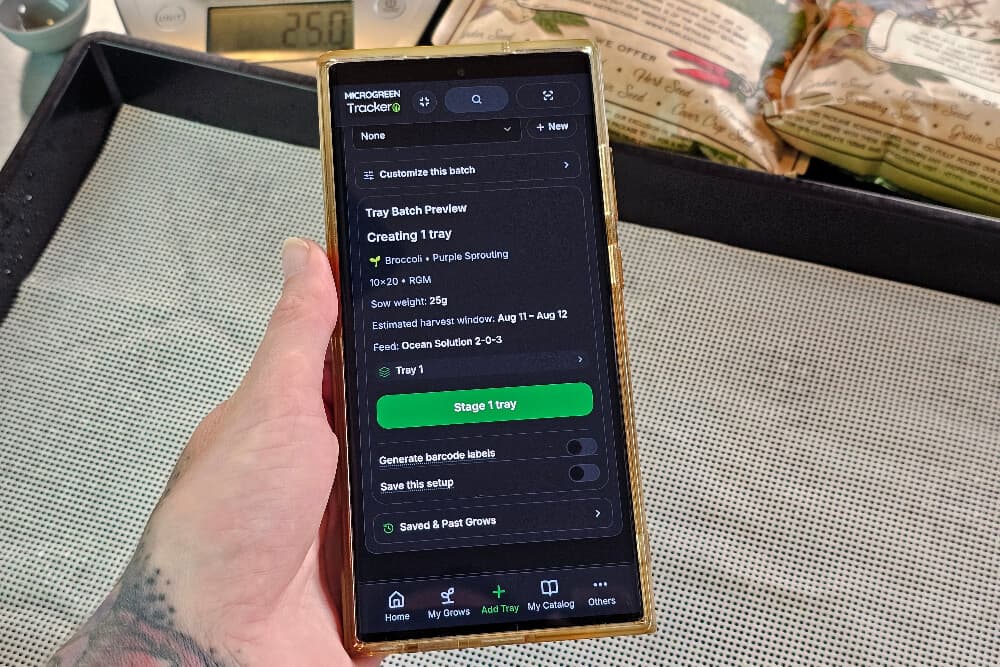
Pick the crop and variety, set the sow date, and the app fills in pre-soak hours, blackout days, and your expected harvest date. Sow weight is calculated for your tray size.
Work today’s list
Your dashboard shows only what needs attention today: water these, uncover those, harvest this one. Check off as you go and it clears.
Log the harvest and improve
Record weight and quality. Your history tells you which varieties and methods produce, so the next round is better than the last.
Growing a few trays? Turn on Simple Mode.
One switch strips the app back to what a small grow needs. It’s a per-person view, not a cheaper plan, and switching it off brings everything back with nothing lost.
Three tabs
Home, My Grows, and Plant. Supplies, Settings, and Help sit one tap away.
No number overload
Grams, water volumes, costs, and yields stay out of sight.
Plant in three picks
Crop, variety, and sow weight. The schedule fills itself in.
Growers are sprouting smiles
“This app makes it so easy to keep track of my trays. Thank you!”
“The app is very easy to use plus I enjoy clean look that it has.”
Plans that grow with you
From a shelf on the counter to a farm with a team, every plan has the whole app.
Starter
A shelf on the counter
$3.95/ month
Billed monthly
- 25 active trays
- You + 1 team login
- Every feature
- Room to grow
Grow
A rack in the spare room
$9.95/ month
Billed monthly
- 100 active trays
- You + 3 team logins
- Every feature
Pro
A grow room that sells
$19.95/ month
Billed monthly
- 1,000 active trays
- You + 5 team logins
- Every feature
Scale
A farm with a team
$39.95/ month
Billed monthly
- 2,500 active trays
- You + 9 team logins
- Every feature
Every plan includes all of it
- Daily task list
- Push reminders
- Cost per tray
- Orders and customers
- Labels and scanning
- Grow Stats
- CSV and Excel export
You pick a plan at the end of setup and can change it any time.
- Card required, nothing charged for 7 days
- Cancel anytime
- Your trays and data carry over
Who Microgreen Tracker is for
Not built for hydroponic leafy greens, cannabis, or general vegetable gardening. The timing model is microgreens-specific on purpose.
Frequently Asked Questions
Is there a free microgreen tracking app?
You can run the whole app free for 7 days, and it is the real app, not a demo. After that plans start at $3.95 a month or $39.95 a year, and you can cancel any time from Settings. See the plans.
How much does microgreen tracking software cost?
Plans start at $3.95 a month after a free 7-day trial and go up to $39.95 a month for 2,500 trays. Every plan has the same features; you are choosing tray capacity and collaborator seats. Every plan can also be paid yearly, for about 16% less than twelve months. Compare plans.
What is Microgreen Tracker?
Microgreen Tracker by On The Grow is an app for managing microgreen grows from seed to harvest. It tracks every tray through its real growing stages and turns your grow room into one short daily task list. It also handles supplies, customer orders, and planting plans, with 81 crops built in.
How is this different from a spreadsheet?
A spreadsheet is a record you read before you work out what to do; this leads with the work. Each day it builds your checklist from every tray’s stage and each crop’s timing, overdue work first. It also back-calculates sow dates, costs each tray down to the electricity, and turns orders into planting plans.
Do I need to download an app, or does it work in a browser?
No download is needed: it works in any phone or desktop browser. Add it to your home screen and it opens full-screen like a native app, with your data synced across every device. How to install it.
How many microgreen varieties does it support?
81 crops and 286 varieties ship built in, from broccoli and radish to pea, sunflower, and basil. Each carries sow weight, pre-soak, germination, blackout, and harvest timing, and you can override any value or add crops of your own.
Does it send watering reminders to my phone?
Yes, on every plan: push notifications at morning and evening times you choose, plus optional harvest-day and delivery-day reminders. They are grouped, so forty trays due is one notification, not forty. There are no reminder emails or texts.
What can I track?
Every tray, with each stage change, watering, and note on its timeline, plus harvests with weight, grade, and yield, and failures with a reason. Seed, medium, fertilizer, and equipment stock is kept per purchase batch, so any tray traces back to its seed lot. Customers, orders, and standing orders too.
Can I track customer orders and delivery dates?
Yes. Enter an order in pounds and ounces and the app builds a planting plan that counts every crop back from one harvest date, then plants the whole batch with one button. Delivery dates sit on the calendar, and standing weekly orders generate themselves.
Will it work for a commercial microgreen farm?
Yes, up to 2,500 active trays and 9 collaborator seats on Scale. Bulk actions, scanning a whole shelf at once, seed-lot traceability, order-driven planting plans, and CSV and Excel export are built for that volume. See plan sizes.
Can other people on my farm use it?
Yes. Invite collaborators with a link and they work on the same trays, while billing and members stay with you as the owner. Seats are included in every plan, from 1 on Starter to 9 on Scale, with no per-seat charge.
Can I export my grow data?
Yes, to CSV and Excel: Grow Stats and harvest history, tray data, single orders, your customer list, and the calendar. There is no spreadsheet import yet, so existing records cannot be brought in in bulk.
I only grow a few trays. Is this too much app?
Turn on Simple Mode. It hides the number-heavy detail and makes planting three picks, and it is a per-person switch you can turn off any time without losing anything. What Simple Mode changes.
Is it available in Spanish?
Yes. Every screen in the app is in Spanish, and language is set per person, so two people can share one workspace in different languages. The in-app guides, FAQ, and tours are English only for now.
Does this app track sprouts?
No. It is built for microgreens, grown in soil or on a mat and harvested at the leaves. For sprouts we make a separate app, Sprouting Tracker, at www.sproutingtracker.com.
Is my data private and secure?
Yes. Your grow data is scoped to your workspace and we don’t sell it. See our Privacy Policy and Terms of Service for full details.
Want to learn how to grow microgreens?
Start here, then start tracking. Each topic links to the full guide on our blog.
What do I need to start growing microgreens?
Less than you think. A tray, something to grow in, good seed, water, and a light. Keep it damp, give it light, and most crops are ready to harvest 7 to 14 days after sowing.
- How to Grow Microgreens: A Complete Step-by-Step Guide (opens On The Grow in a new tab)
- How to Start Growing Microgreens: A Beginner’s Guide (opens On The Grow in a new tab)
- What Are Microgreens and How Are They Different From Sprouts? (opens On The Grow in a new tab)
In the tracker: Add your first tray and we work out the harvest date for you.
Why do microgreens need weight and blackout?
Weight pushes roots down and lifts the tray evenly, usually for 2 to 4 days. Then a short stretch in the dark, 24 hours at most for most crops. Then lights on.
- Why Do Microgreens Need Weight? Our 4-Tray Experiment (opens On The Grow in a new tab)
- Microgreens Weight vs Blackout: When to Switch and Why (opens On The Grow in a new tab)
In the tracker: Each tray shows up on your dashboard the day it is due to move.
How often should I water microgreens?
Mist 1 to 2 times a day while the tray is under weight. Once it goes under lights, switch to bottom watering so the leaves stay dry. Damp, never soaked. Microgreens don’t want to swim.
In the tracker: Log each watering in a tap and see how much water every tray used.
What light do microgreens need?
A plain white LED does the job. We run lights 16 to 17 hours a day on a timer, about 6 to 12 inches above the greens. Pale, leggy trays almost always mean too little light.
- Microgreen Lighting: Best Grow Lights After 7 Years of Testing (opens On The Grow in a new tab)
- How to Build a Professional Microgreens Grow Rack (opens On The Grow in a new tab)
In the tracker: Add your lights in Supplies and see what they cost per tray.
Is that mold, or root hairs?
Fine white fuzz at the roots is often root hairs, and they flatten when you mist them. Mold stays fuzzy and spreads. Keep humidity around 40 to 60% and keep the air moving.
- Microgreens and Mold: Prevention, Identification, and Treatment (opens On The Grow in a new tab)
- Top Microgreen Growing Mistakes and How to Avoid Them (opens On The Grow in a new tab)
- Microgreen Troubleshooting (opens On The Grow in a new tab)
In the tracker: Mark a tray as failed and its notes stay, so you can see what went wrong.
How do I harvest microgreens?
Harvest when the first true leaves show, usually 7 to 14 days in. Use a sharp knife just above the medium, in the morning while the leaves are dry. Don’t wash them before they go in the fridge.
- What Works Best for Harvesting Microgreens: Knife vs Scissors vs Electric Trimmers (opens On The Grow in a new tab)
- Will Microgreens Regrow After Harvesting? (opens On The Grow in a new tab)
In the tracker: Log the weight of each harvest, and your own numbers become your baseline.
Which microgreens should I grow first?
Radish and broccoli are fast and forgiving. Peas and sunflower are big seeds that fill a tray quickly.
- How to Grow Radish Microgreens (opens On The Grow in a new tab)
- How to Grow Broccoli Microgreens (opens On The Grow in a new tab)
- How to Grow Pea Microgreens (opens On The Grow in a new tab)
- How to Grow Sunflower Microgreens (opens On The Grow in a new tab)
In the tracker: 81 crops are built in, each with its own days to harvest.
Can I sell microgreens?
Plenty of growers sell to neighbors, markets, and restaurants. Check your local rules first, then start small with a few crops chefs already ask for.
- How to Sell Microgreens: Pricing, Permits, and Starting a Business (opens On The Grow in a new tab)
- Sell Microgreens Guide (opens On The Grow in a new tab)
- Best Microgreens for Restaurants (opens On The Grow in a new tab)
In the tracker: Track customers and orders, and know what each tray cost you.

- Card required, nothing charged for 7 days
- Cancel anytime
- Your trays and data carry over
Already have an account? Sign in
- 81 crops
- 286 varieties
- 9 tracked stages
- Up to 2,500 active trays
- English and Spanish
- Push reminders
- Works in any phone browser